
You probably received a lot of information when you picked up your bike. We understand that it can be hard to remember everything, so we’ve created some tutorial videos that you can access anytime for more information about your bike.
Looking for the specifications of your Power Plus e-Bike? Please have a look here.
In this product manual you can find safety guidelines and technical information about your bike.
Did you know you can complete your worry-free biking package with additional Theft Coverage? Find out more information here, or ask about it in store!
In order to watch all the videos available in this article, you will need to accept all cookies.
A Swapfiets Guide on Lights
You will find a small button on the underside of the display. Simply press this button to turn your lights on or off manually.
Smart Memory: If you prefer, you can just leave the lights switched on. The system will remember your last setting, so the lights will automatically turn back on the next time you turn on your bike.
Lights not working? Please book an appointment via the app here so we can fix your lights.
A Swapfiets Guide on Locks
Your bike is equipped with strong anti-theft double locks. The video below shows you how to lock and unlock your bike.
Please remember to wrap the chain lock around a secured object.
Don’t mind the bike model in the video - the locks shown here work exactly the same way as the one on your Power Plus!
A Swapfiets Guide on Brakes
Our Power Plus comes with two hydraulic disc brakes (hand brakes). The left lever operates the front brake; the right lever operates the rear brake.
Caution: Pulling the hand brake too quickly may lift your rear wheel.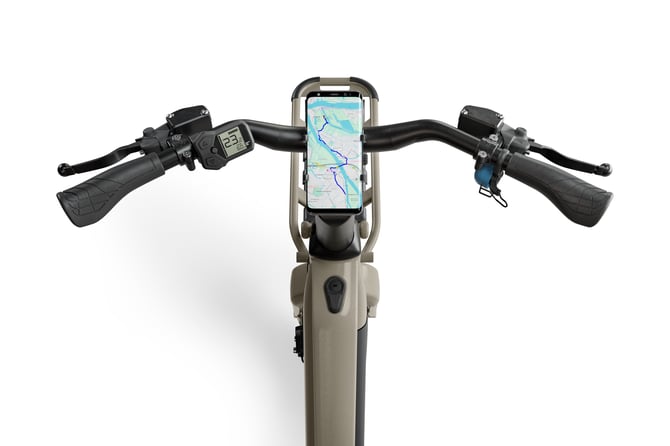
A Swapfiets Guide on the Display
Wondering how to read your fancy e-Bike display? The video below explains everything about it.
The display will automatically turn on when you turn on your bike. You can use the display to increase and decrease assistance.
Don’t mind the bike model in the video - the locks shown here work exactly the same way as the one on your Power Plus!
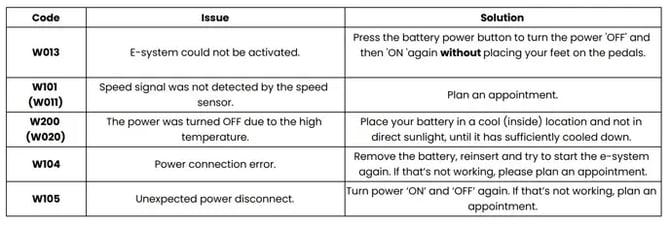
Received an error code? See the overview below to find out what it means and what action to take.
A Swapfiets Guide on the Battery
The battery is easily removable and integrated in the frame. You can charge it at home.
Via this link you can find some more information about the battery from the battery producer.
Caution: Always unlock your bike first before inserting the battery to ensure you don’t put the battery in the wrong bike.
By watching these videos, you should know all the important basics about your bike! If something is unclear or you have an issue with your bike, please feel free to reach out to our customer support team or book an appointment in the app to get your bike fixed.