
How your lights work
The lights will automatically turn on when the bike is on. In the video below, you will see how this works for your Power 7 bike.
Lights not working? Please open your Swapfiets app to book a repair appointment so we can fix your lights for you.
In order to watch all the videos available in this article, you will need to accept all cookies.
How to lock your bike safely
Your bike is equipped with strong anti-theft double locks. The video below shows you how to lock and unlock your bike.
Please remember to wrap the chain lock around a secured object.
Learn how to add extra Theft Coverage to your subscription package.
⚠️Battery Caution: Always unlock your physical bike frame lock before sliding your battery back in. This ensures you never accidentally force the battery into the wrong bike.
Using your brakes
Safety first: hand and coaster brakes. The video below demonstrates how to use the hand and coaster brakes.
⚠️Brake Caution: Pulling your hand brake too quickly can lift your rear wheel. Apply pressure smoothly to stop safely.
Shifting through your 7 gears
To shift gears smoothly on your Power 7:
- Briefly stop pedaling.
- Twist the handlebar grip to your desired gear.
- Resume pedaling to master any terrain.
Reading your e-Bike display
The display will automatically turn on when you turn on your bike. You can use the display to increase and decrease assistance.
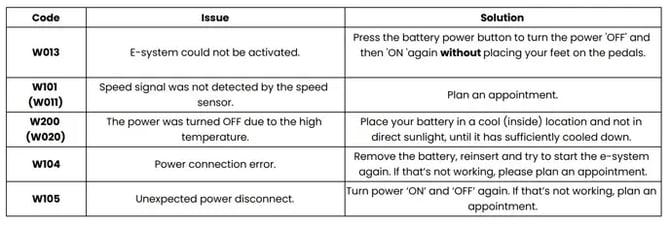
Troubleshooting display error codes
Charging and managing your battery
The video below provides basic information about the battery: how to remove, charge, and insert it.
Read the official Shimano battery guide for deep technical details from the manufacturer.
Caution: Always unlock your bike first before inserting the battery to ensure you don’t put the battery in the wrong bike.
Tech specs and product manual
- Check out our full Power 7 technical specifications guide.
- Read our product manual for safety guidelines and technical information.
By watching these videos, you should know all the important basics about your bike! If something is unclear or you have an issue with your bike, please feel free to reach out to our customer support team or book an appointment in the app to get your bike fixed.