
Using the Lights on Your Power Plus e-Bike
You will find a small button on the underside of the display. Simply press this button to turn your lights on or off manually.
Smart Memory: If you prefer, you can just leave the lights switched on. The system will remember your last setting, so the lights will automatically turn back on the next time you turn on your bike.
Lights not working? Please book an appointment via the app here so we can fix your lights.
In order to watch all the videos available in this article, you will need to accept all cookies.
How to Lock Your Power Plus e-Bike Safely
Your bike is equipped with strong anti-theft double locks. The video below shows you how to lock and unlock your bike.
Please remember to wrap the chain lock around a secured object.
Don’t mind the bike model in the video - the locks shown here work exactly the same way as the one on your Power Plus!
Using Your Power Plus Hydraulic Disc Brakes”
Our Power Plus comes with two hydraulic disc brakes (hand brakes). The left lever operates the front brake; the right lever operates the rear brake.
Caution: Pulling the hand brake too quickly may lift your rear wheel.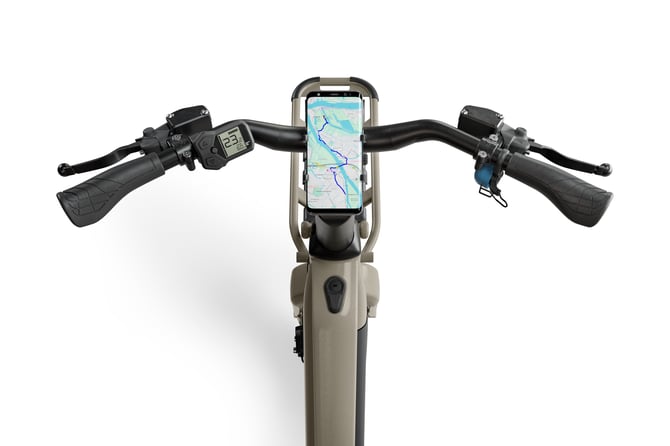
Understanding Your Power Plus Display and Error Codes
Wondering how to read your fancy e-Bike display? The video below explains everything about it.
The display will automatically turn on when you turn on your bike. You can use the display to increase and decrease assistance.
Don’t mind the bike model in the video - the locks shown here work exactly the same way as the one on your Power Plus!
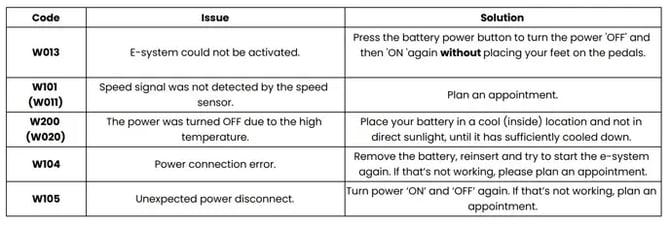
Troubleshooting display error codes
Charging and Removing Your Power Plus Battery
The battery is easily removable and integrated in the frame. You can charge it at home.
To charge the battery through the bike:
- Look on the left side of the bike frame.
- Find the charging connector located at the bottom, near the base of the seat tube.
- Plug the provided cable into the connector and insert the power plug into a standard outlet.
Every bike is delivered with a standard charging cable and an additional charging adapter (connector piece).
- Connect the Adapter: Before plugging the charger into the battery, attach the extra adapter piece directly to the tip of the main charging cable. The charger will connect with the bottom of the battery.
Via this link you can find some more information about the battery from the battery producer.
Caution: Always unlock your bike first before inserting the battery to ensure you don’t put the battery in the wrong bike.
By watching these videos, you should know all the important basics about your bike! If something is unclear or you have an issue with your bike, please feel free to reach out to our customer support team or book an appointment in the app to get your bike fixed.